
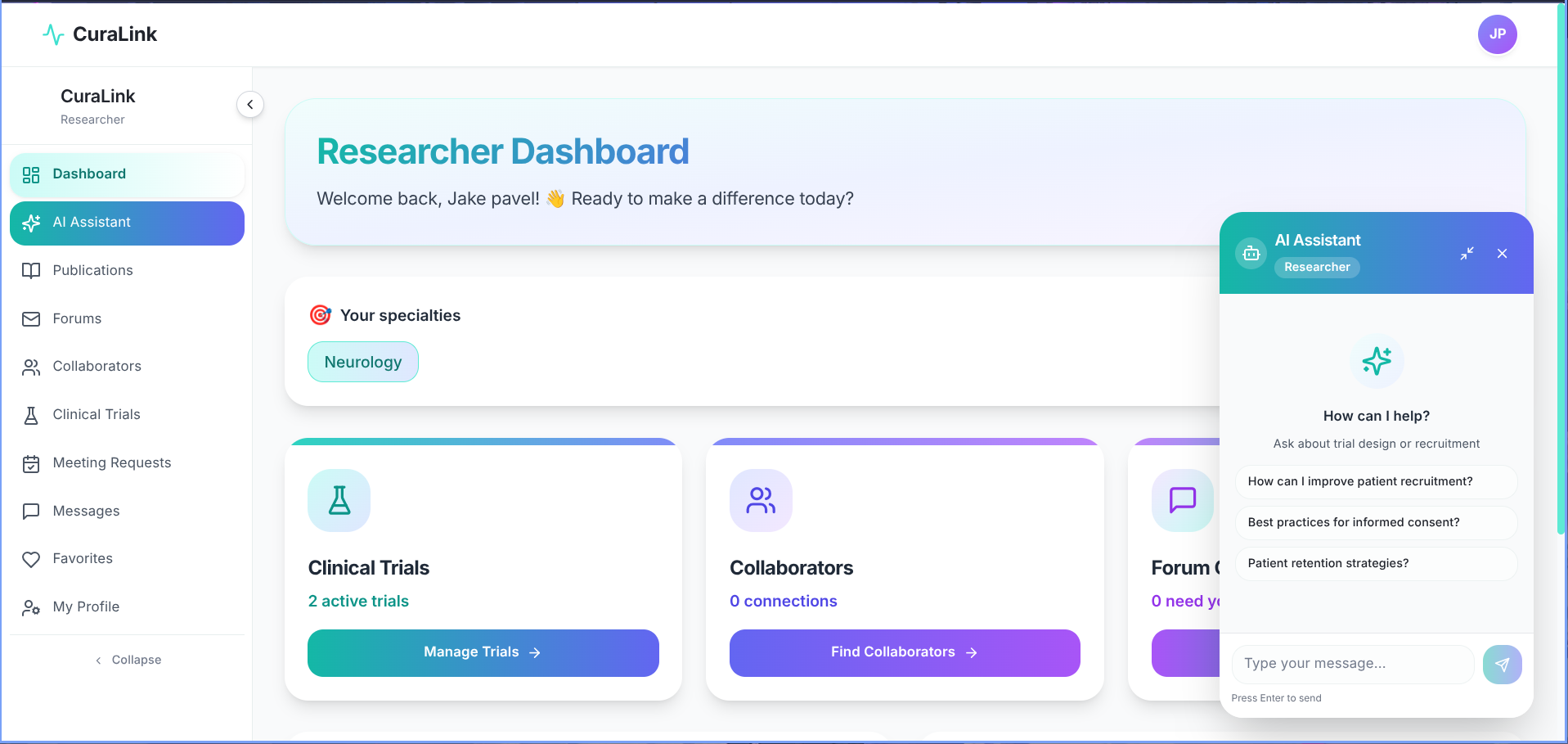
CuraLink is an AI-powered clinical research platform that helps patients discover clinical trials, publications, and experts while enabling researchers to collaborate, manage studies, and connect with participants.
🌐 Try now at curalink-research.vercel.app
Key Features
For Patients
- Natural Language Search - Describe your condition in plain language
- Clinical Trial Recommendations - Personalized matches from ClinicalTrials.gov
- Expert Discovery - Search and connect with health researchers
- Publication Browser - Explore relevant medical research
- Community Forums - Post questions and get answers from researchers
- Favorites - Save trials, publications, and experts
- Meeting Requests - Schedule consultations with researchers
For Researchers
- ORCID Integration - Link and verify your research identity
- Trial Management - Create and manage your clinical trials
- Researcher Collaboration - Connect with peers across institutions
- Forum Responses - Engage with patient questions
- Publication Discovery - Browse and save relevant papers
- Meeting Management - Accept or decline patient consultation requests
Platform
- AI-Powered Summaries - Gemini Pro translates research into patient-friendly language
- Smart Keyword Extraction - Auto-extract disease terms from natural language input
- Role-Based Access - Separate, tailored experiences for patients and researchers
Project Structure
The project is organized using the Next.js App Router:
curalink/
├── app/                        # Next.js App Router pages
│   ├── (auth)/                 # Authentication routes
│   ├── (patient)/              # Patient-facing pages
│   ├── (researcher)/           # Researcher dashboard pages
│   └── api/                    # API route handlers
├── components/                 # Reusable UI components
├── lib/                        # Database connection and utilities
├── models/                     # Mongoose schemas and models
├── hooks/                      # Custom React hooks
├── context/                    # React context providers
├── utils/                      # Helper functions and external API integrations
│                               # (ClinicalTrials.gov, PubMed, ORCID, Google Scholar)
├── .env.local.example          # Environment variables template
├── package.json                # Dependencies and scripts
└── README.md                   # Project documentation
How To Use
To clone and run this application, you'll need Git, Node.js, and MongoDB (or Docker) installed on your computer.
Clone the repository
git clone https://github.com/your-username/curalink
cd curalink
Install dependencies
npm installConfigure environment variables
cp .env.local.example .env.localRequired variables:
MONGODB_URI- MongoDB connection stringNEXTAUTH_SECRET- NextAuth.js secretGEMINI_API_KEY- Google Gemini API keyPUBMED_API_KEY(optional) - PubMed credentialsORCID_CLIENT_ID/ORCID_CLIENT_SECRET(optional) - ORCID OAuth
Start MongoDB (if running locally)
# Using Docker
docker run -d -p 27017:27017 --name mongodb mongo:latest
Run the development server
npm run devThen open http://localhost:3000 in your browser.
Development
CuraLink runs as a Next.js application using the App Router and Server Actions. Configure the required MongoDB, authentication, Gemini, and optional external API credentials before starting the development server.
How to Contribute
Clone the repo and create a new branch:
git checkout -b name_for_new_branchMake your changes and test thoroughly.
Submit a Pull Request with a comprehensive description of your changes.
Technologies
This software uses the following technologies:
- Frontend: Next.js 14+ (App Router) + TypeScript + Tailwind CSS
- Backend: Next.js Server Actions
- Database: MongoDB (Mongoose ODM)
- Authentication: NextAuth.js with JWT
- AI: Google Gemini Pro - keyword extraction and patient-friendly summarization
- External APIs: ClinicalTrials.gov, PubMed, ORCID, Google Scholar
License
MIT