

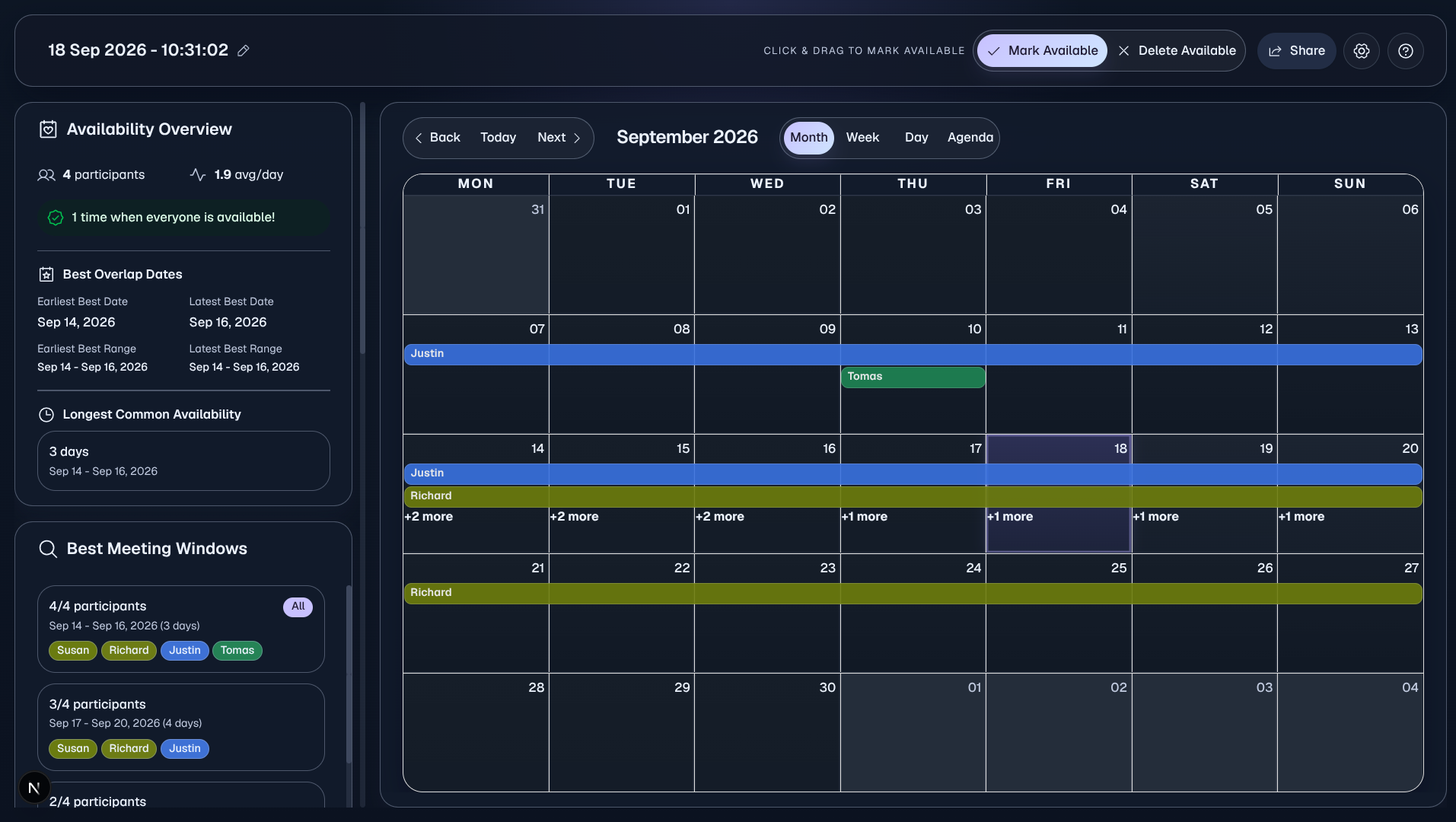
Overlap is a real-time collaborative calendar that lets you and your friends visually mark your availability and instantly find the perfect time to meet, without the endless back-and-forth messages, polls, or creating yet another account.
✨ Try now at overlapcalendar.vercel.app
Features
- No Signup Required - Start planning immediately
- Visual Availability Marking - Click and drag to mark when you're free
- Real-time Collaboration - See updates from friends instantly
- Secure Sharing - Share calendars with a unique ID and PIN
How It Works
- Create or Join - Start a new calendar or join an existing one with ID & PIN
- Mark Availability - Click and drag on dates when you're available
- Share with Friends - Send the calendar ID and PIN to your group
- Find Common Time - Instantly see when everyone is free
Tech Stack
- Framework: Next.js 15
- Language: TypeScript
- Styling: Tailwind CSS 4.0
- UI Components: shadcn/ui
- Database: PostgreSQL via Supabase
- ORM: Prisma
- Real-time: Supabase Realtime Broadcast
- Calendar: React Big Calendar
- Bot Protection: Vercel BotID
- Deployment: Vercel
Project Structure
The project is organized using the Next.js App Router:
Overlap
├── app/                           # Next.js app router
│   ├── api/                       # API routes
│   │   ├── calendar/              # Calendar endpoints
│   │   │   ├── create/            # POST: Create new calendar
│   │   │   ├── join/              # POST: Join existing calendar
│   │   │   └── [id]/              # Calendar-specific operations
│   │   │       ├── events/        # GET/POST/DELETE: Manage events
│   │   │       ├── rotate-pin/    # POST: Rotate calendar PIN
│   │   │       └── update/        # PATCH: Update calendar details
│   │   └── cron/                  # Scheduled jobs
│   │       └── cleanup-calendars/ # Clean up old calendars
│   ├── calendar/                  # Calendar pages
│   │   └── [id]/                  # Dynamic calendar view
├── components/                    # React components
│   └── ui/                        # shadcn/ui components
├── lib/                           # Utility functions and services
│   └── supabase/                  # Supabase configuration
├── prisma/                        # Database configuration
├── public/                        # Static assets
└── package.json                   # Dependencies and scripts
Prerequisites
Before you begin, ensure you have the following installed:
- Node.js 18+
- pnpm (recommended) or npm
- Supabase account (free tier works)
Getting Started
After checking the prerequisites above, follow these steps to set up the project.
Clone the repository
git clone https://github.com/kunaldasx/overlap-calendar.git
cd Overlap
Install dependencies
pnpm installCopy environment variables
cp .env.example .env.localSet up Supabase
- Sign up or log in at app.supabase.com
- Create a new project (free tier is fine)
- In Settings → API, copy:
Project URL→NEXT_PUBLIC_SUPABASE_URLanon public key→NEXT_PUBLIC_SUPABASE_ANON_KEY
- In Database → Connection info, copy:
DATABASE_URLDIRECT_URL
You do not need to set the
CRON_SECRETenvironment variable for local development.Initialize the database schema
pnpm prisma generateruns automatically after dependencies are installed via the postinstall script inpackage.json.pnpm prisma db pushRun the development server
pnpm devYour app will be available at http://localhost:3000.
Usage
Creating a Calendar
- Visit the website
- Click Create Calendar
- Start marking your availability
- Share the invite link with friends
Joining a Calendar
Click an invite link or enter the ID and PIN received from a friend.
Marking Availability
- Add Availability: Select Mark Available and drag across dates
- Remove Availability: Select Delete Available and drag across dates
- Edit Calendar Name: Click on the calendar name in the top bar
Contributing
Contributions are welcome!
Development
# Run development server (with Turbopack)
pnpm dev

# Build for production (with Turbopack)
pnpm build

# Run production build
pnpm start

# Linting and formatting
pnpm lint:check       # Run ESLint check
pnpm lint:fix         # Fix ESLint issues
pnpm format:check     # Check formatting with Prettier
pnpm format:fix       # Fix formatting with Prettier

# Database commands
pnpm db:push          # Push schema changes to database
pnpm db:generate      # Generate Prisma client
pnpm db:migrate       # Run database migrations
pnpm db:studio        # Open Prisma Studio
Environment Variables
# Supabase
NEXT_PUBLIC_SUPABASE_URL=your_supabase_url
NEXT_PUBLIC_SUPABASE_ANON_KEY=your_anon_key

# Database (for Prisma)
DATABASE_URL=your_database_url
DIRECT_URL=your_direct_url

# Cron
CRON_SECRET=your_cron_secret
License
This project is licensed under the Apache-2.0 License - see the LICENSE file for details.
Author
Kunal Das
- Website: kunaldasx.vercel.app
- GitHub: @kunaldasx
Acknowledgments
- React Big Calendar for the calendar component
- Supabase for the backend infrastructure
- Vercel for hosting and bot protection
- shadcn/ui for UI components
Support
For support, please open an issue or contact me at kunaldasx.vercel.app/contact.
🌐 Visit my website →
🖥️ GitHub · 💼 LinkedIn · 🐦 Twitter / X